
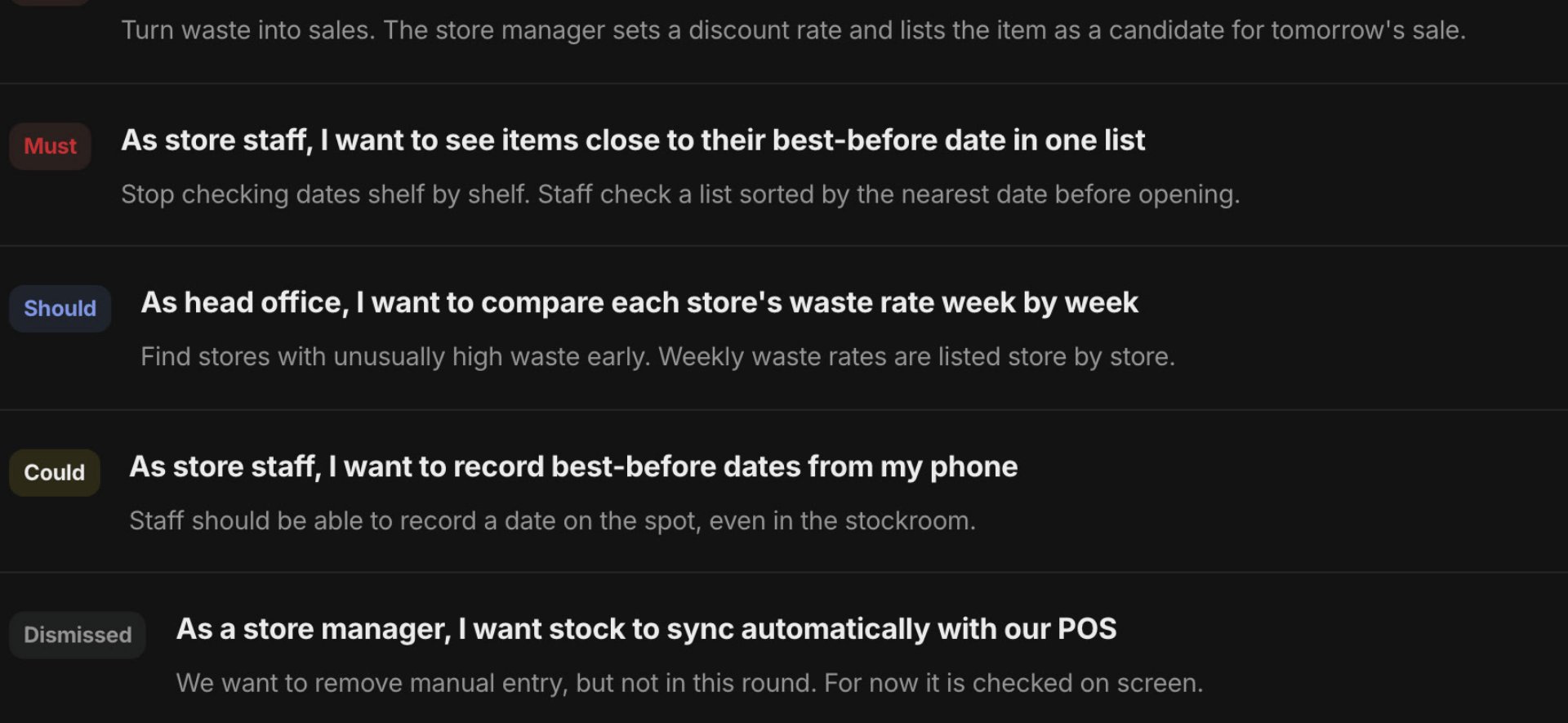
01 / 04
Add your meeting notes
Add one set of meeting notes and they are split into requests, open questions and what is out of scope. Nothing is registered until you review and approve it.
For PMs, engineers and clients
A different loss in each role.One flow to stop them.
PMs go back to reviewing and deciding. Engineers implement without guessing. Clients can see what they asked for and how far it has gone. AI organises and reflects; people confirm.
How it works
People decide this round's scope and priority. Organising, follow-up questions and progress updates run automatically.
01 / 04
Add one set of meeting notes and they are split into requests, open questions and what is out of scope. Nothing is registered until you review and approve it.
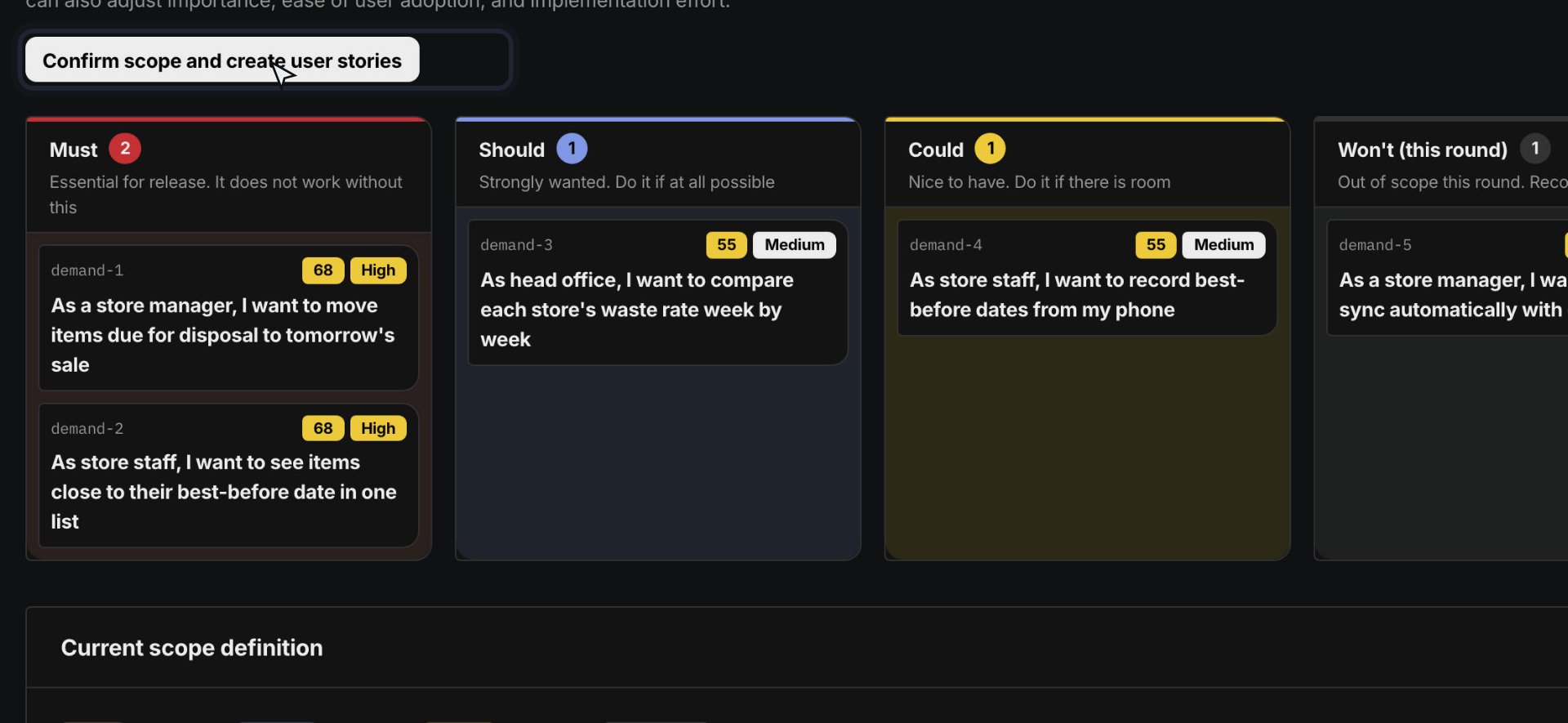
02 / 04
Place requirement cards in four columns: Must, Should, Could and Not this round. Nothing is promised until you press confirm.
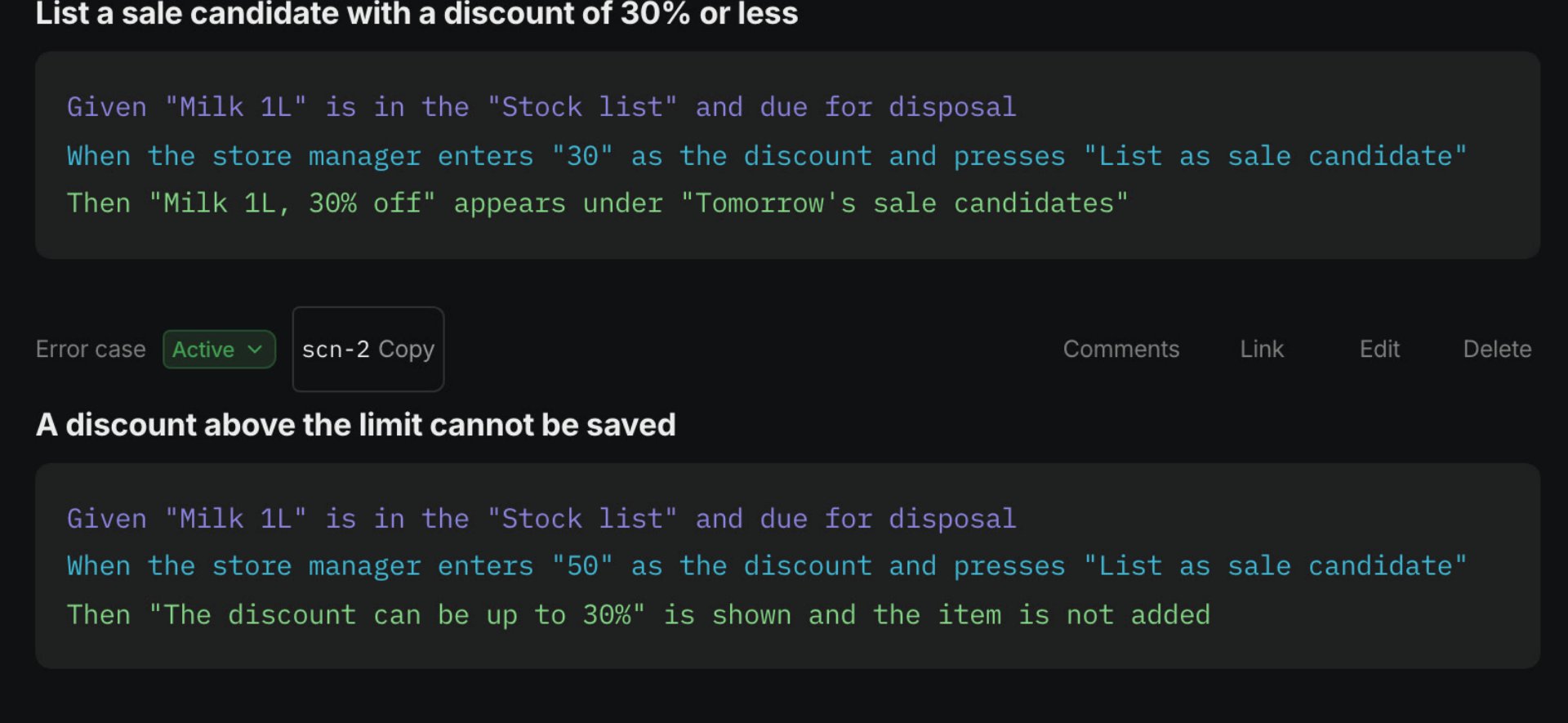
03 / 04
Each story gets acceptance scenarios written as Given, When and Then. What is still open becomes a question you can ask in Slack.
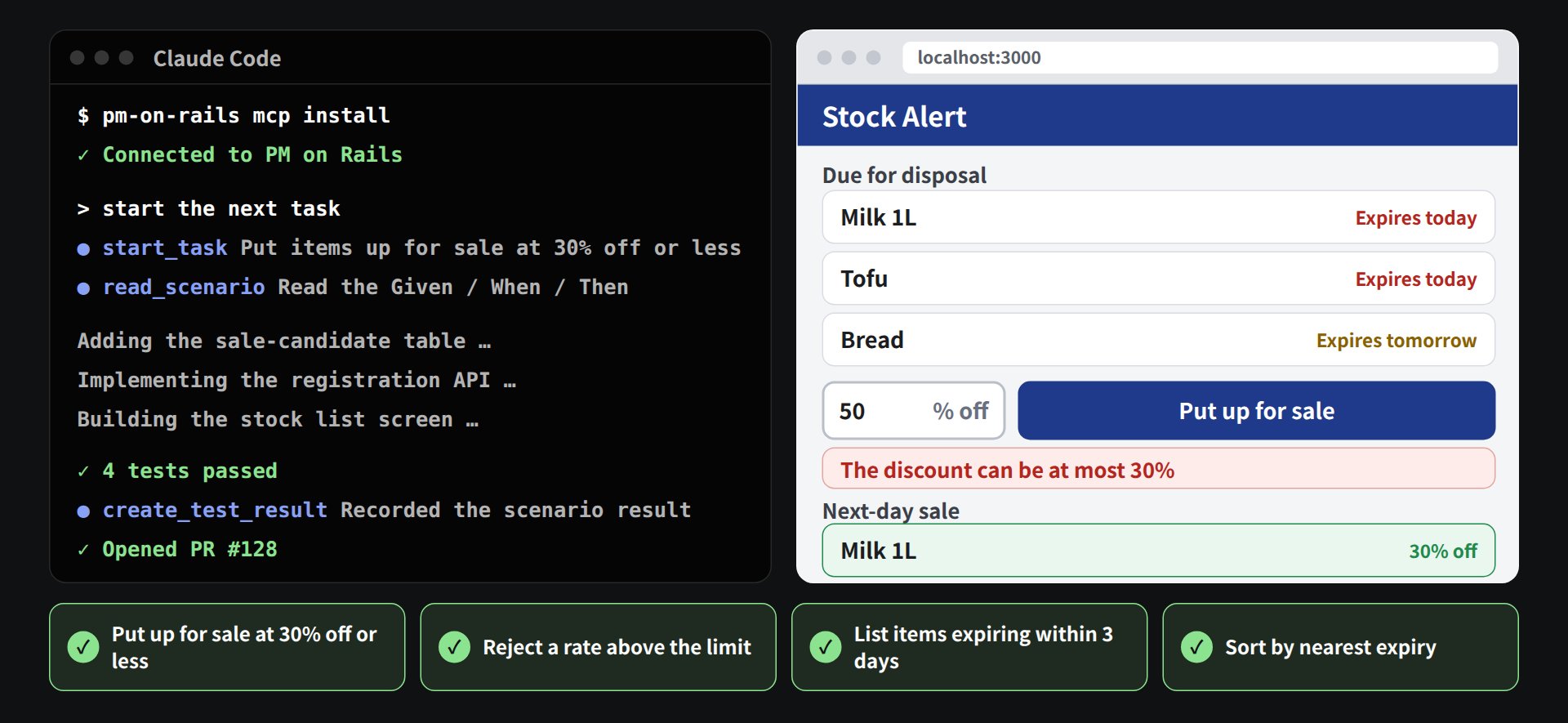
04 / 04
Once connected over MCP, Claude Code or Codex reads the request background, the acceptance criteria and what is out of scope before implementing. Pull request activity is reflected in tasks and progress.
Choose how to start
Web
Start without installing. Sign in and continue to your workspace.
Desktop
BetaLaunch from the Dock and sign in with the same account as the web app. It is a Mac-only beta for now.
During the beta, we email a download link to the address you sign up with.
Whose problem
The same project hurts the PM, the engineer, the client and the owner in different ways. So we start with whose loss we stop, not with a feature list.
01 — PM
The loss today
You guess what to ask, then spend the week putting Slack answers back into specs.
What changes
Meeting notes connect to requests, open questions, Slack follow-ups, scope, acceptance criteria, tasks and pull request status.
02 — Engineer
The loss today
Spec hunting is long, done is vague, and the board still needs a manual update.
What changes
Claude Code and Codex receive the request background, acceptance criteria, dependencies and changes made after work started.
03 — Client
The loss today
You do not know what to ask, so all you can do is wait for a report.
What changes
Even without a technical background, delegation becomes visible instead of a black box.
04 — Owner building in-house
The loss today
After you hire engineers, requirements, delays and change reasons stay invisible.
What changes
Going in-house does not have to mean relying on individual heroics.
05 — Building your own app
The loss today
AI gets a screen working in minutes, but what to build and how far never gets decided.
What changes
Follow the steps and the information the AI needs is assembled for you. Claude Code and Codex read it directly, so you do not write a separate brief.
Why it breaks
When meetings, Slack, tasks and pull requests are disconnected, requirements stay vague, answers scroll away and progress goes stale. The longer those gaps stay open, the more expensive the late fix.
When wishes, decisions and open questions travel together, the mismatch surfaces mid-build. Work starts before anyone knows what to ask.
If the answer never lands back in a requirement or a task, nobody can say where the real spec lives.
When pull requests live apart from the management view, both the PM and the client spend their days chasing the current state.
How projects catch fire
The longer an answer stays out of the requirements and tasks, the more expensive the fix. That is why finding, asking and reflecting has to be one flow.
01
Vague requirement
02
Answered in Slack
03
Never reflected
04
Rework and firefighting
Before and after
Automation is not the point. Review, decisions, implementation and client visibility move in one stream. We used this on a project we took over after another vendor had run long without finishing it, and had it working in about a month.
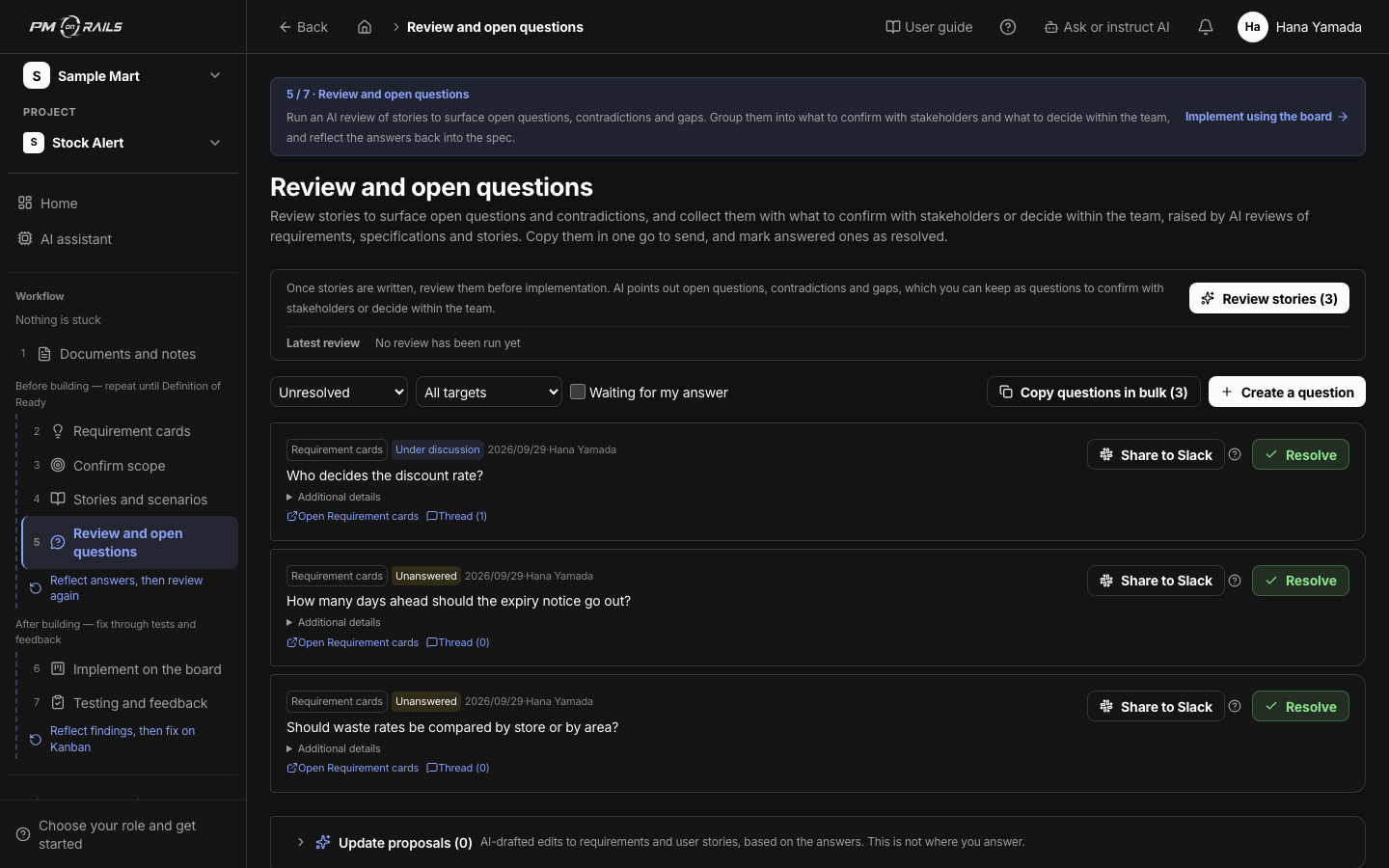
What to ask stays on the screen
The open-questions list: the ask, the owner, waiting on an answer. Before: you scrolled Slack to remember what you asked. After: you return to review and decide.
PM
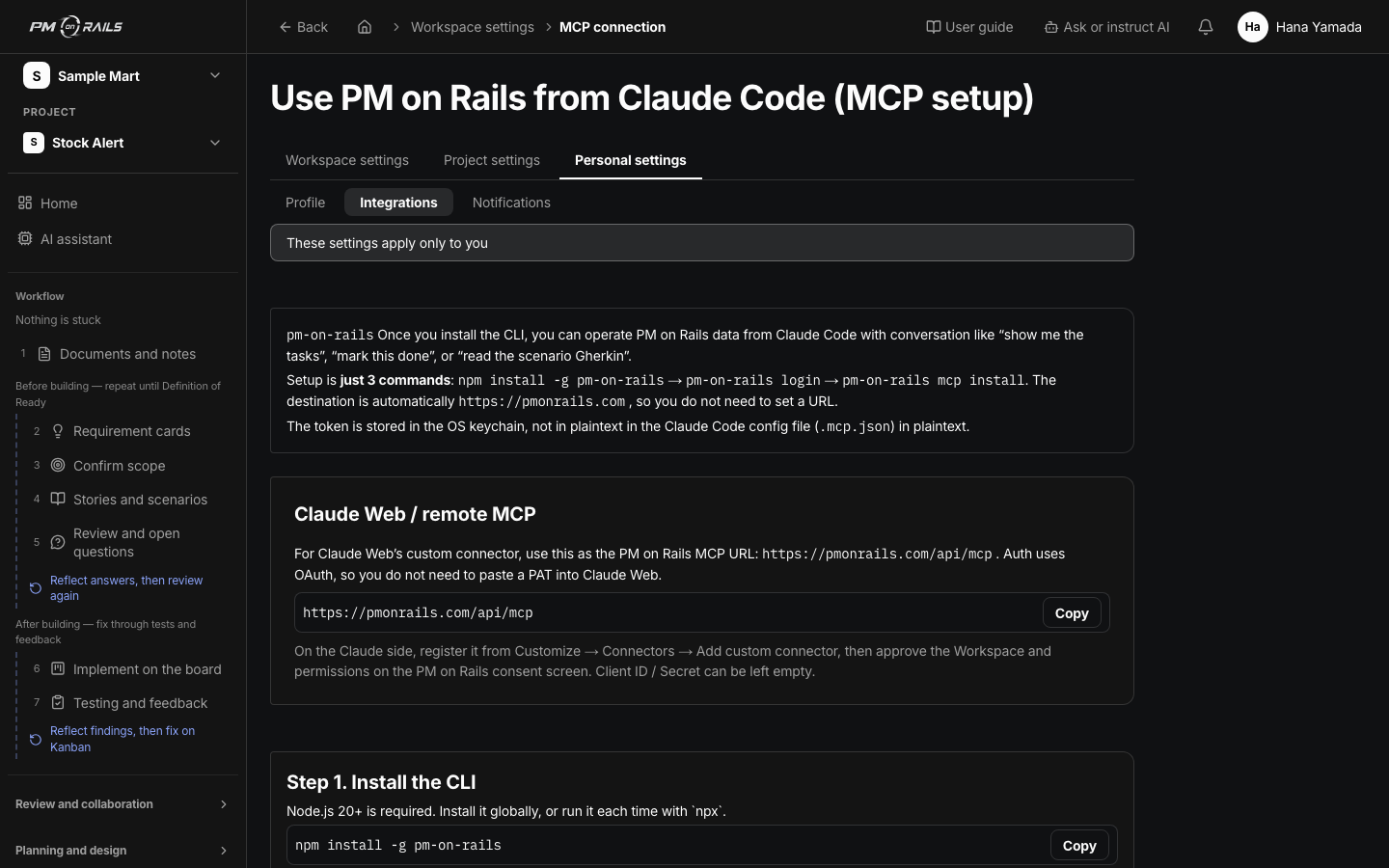
The same acceptance criteria while you implement
Claude Code integration. The coding agent reads requirements, tasks and acceptance criteria. Before: hunt the spec and guess the place. After: read the background and stay out of the board.
Engineer
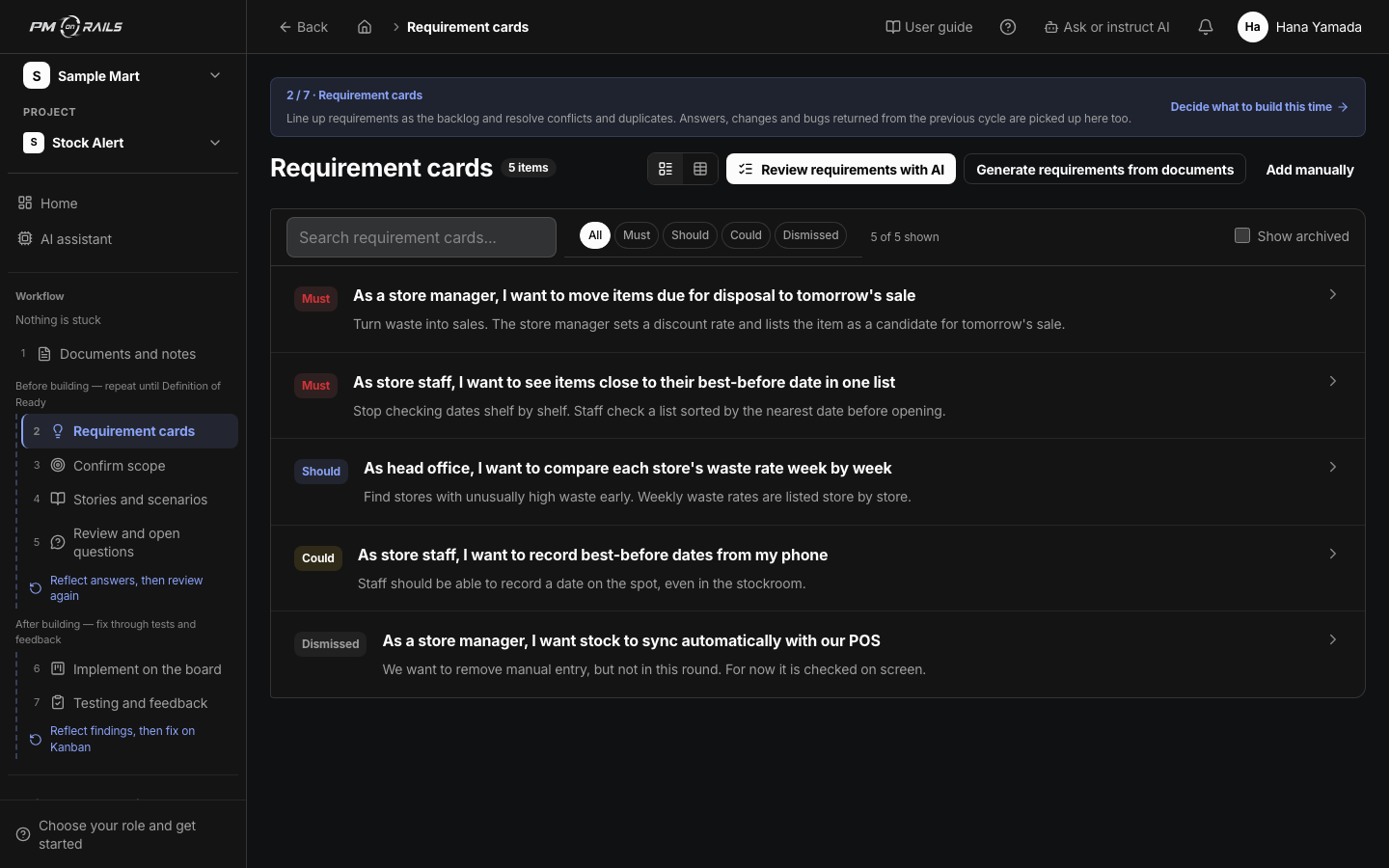
What you said stays as a request
Requirement cards: who wants what, why, and what accepted looks like. Before: meeting words disappeared. After: you can check what you asked for and what is in scope.
Client
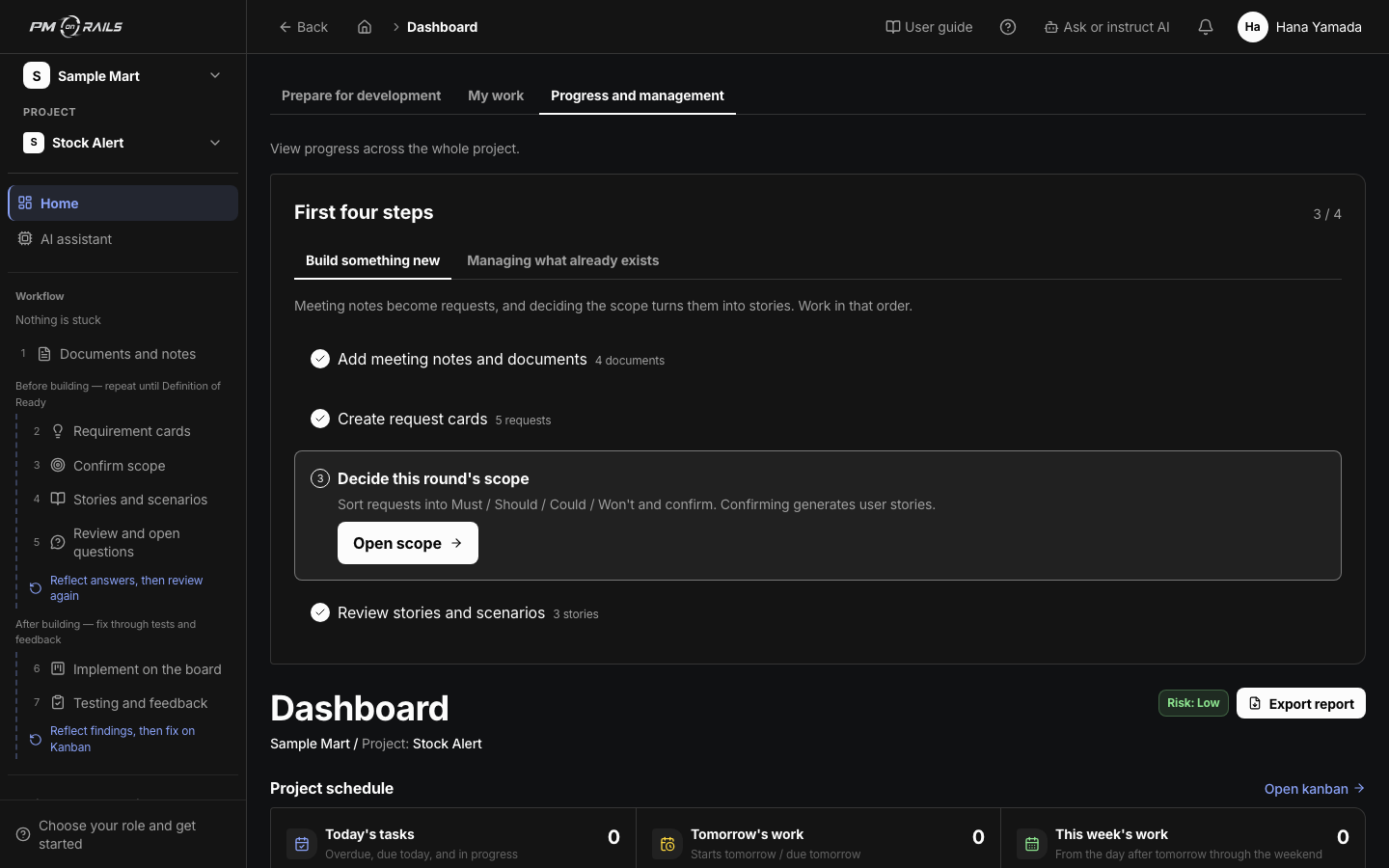
Owners see delays without asking
Dashboard: requirements, tasks, delays and readiness. Before: progress existed only if you asked the person doing the work. After: the business side can follow priorities and why something slipped.
Owner building in-house
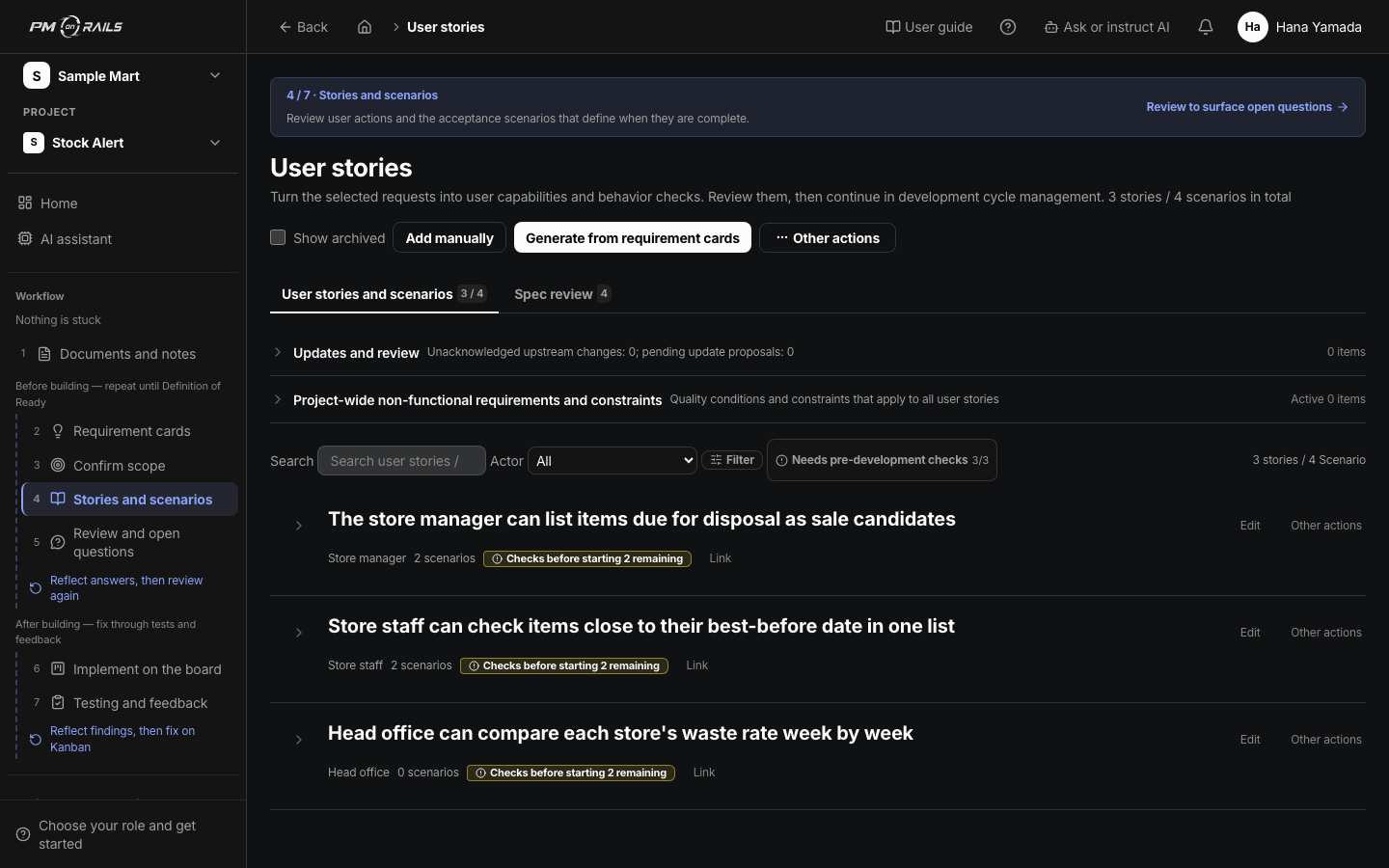
Acceptance criteria the AI reads, written first
Next to each development unit is the path into acceptance scenarios. Before the AI builds, you write what done looks like here.
Building your own app
Why now
AI writes code fast. The speed pushes deciding, confirming and tracking onto people. Once two or three projects run side by side, manual management cannot keep up. If you start next month, whatever is undecided today becomes the project's premise.
01
You used to catch upstream drift during design or implementation. Now whole features are written in one pass, so the wrong thing is finished first.
02
Code is written in a day while confirming requirements and updating progress stays manual. PM on Rails runs organisation, questions and progress updates automatically, so any number of projects fit on one screen.
03
Who it is for, what is out of scope this round, what done looks like. The information an AI build needs falls out of following the steps. Clients and people building their own app work in the same shape.
04
A working screen and something the floor uses every day are different things. Progress without acceptance criteria and a real user's hands on it is not trustworthy.
Even when building is fast, delay shows up here
Dashboard of readiness and delay. Before: implementation was fast and progress was verbal. After: management lag is a number and a list, which is why the investment pays off now.
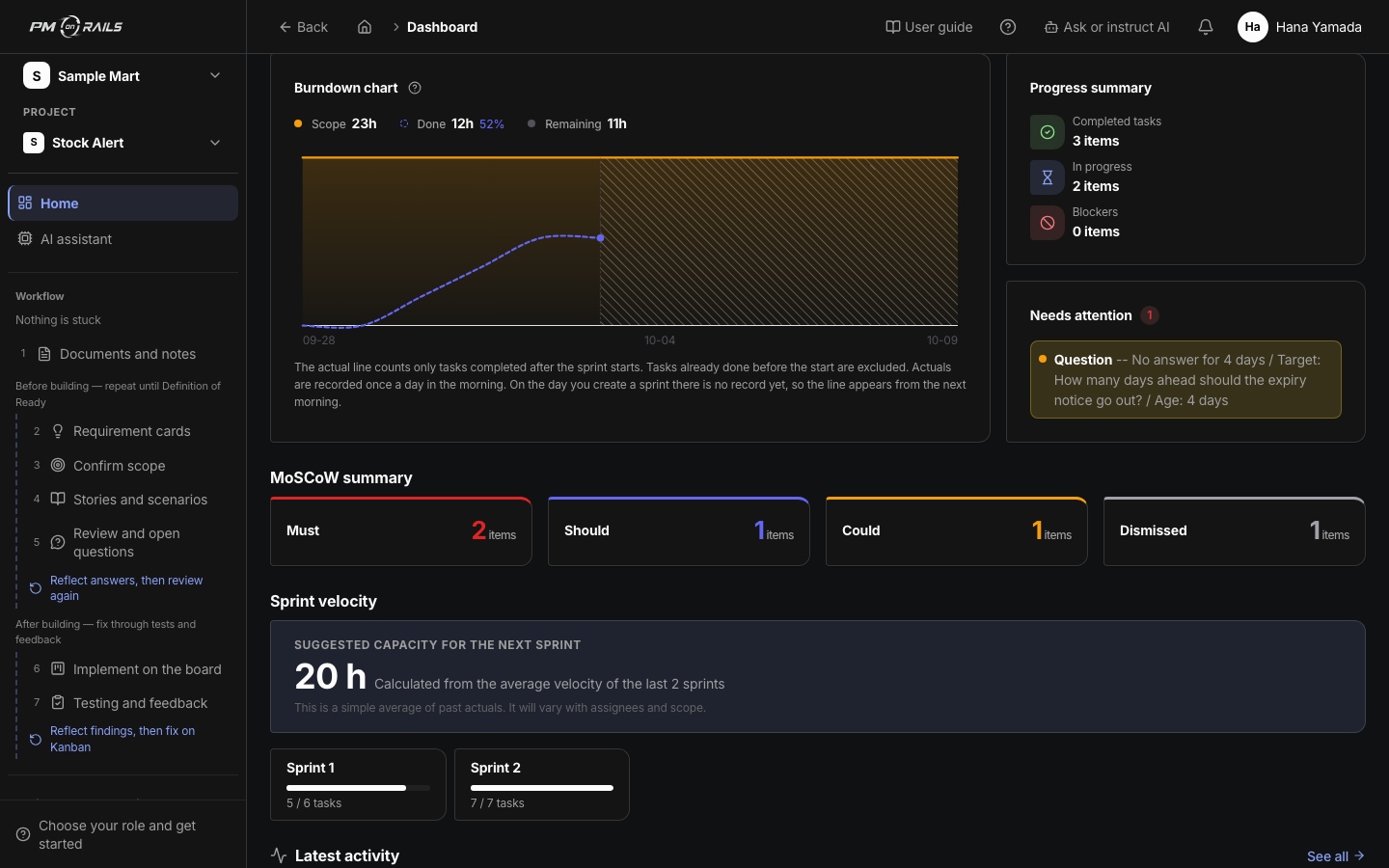
See late rework earlier
Burndown. The line bends when remaining work leaves the plan. Before: firefighting stayed invisible until the deadline. After: the cost of starting with open questions shows up week by week.
The answer
AI organises open points from your documents and helps draft questions for stakeholders. With Slack connected, share the questions, then create and review proposed specification updates from the answers.
AI separates decisions, open questions, out-of-scope items and things to ask, straight from your meeting notes.
Open questions become questions a stakeholder can actually answer, and you ask them where the team already talks.
Replies come back as proposed updates to requirements, acceptance criteria and tasks.
Tasks and pull requests stay linked, so completions and status changes show up in progress.
Requests get organised
Requirement cards. Meeting notes become who wants what, why, and what accepted looks like. Before: wishes and decisions were mixed. After: you ask only about what is still open, then set scope.
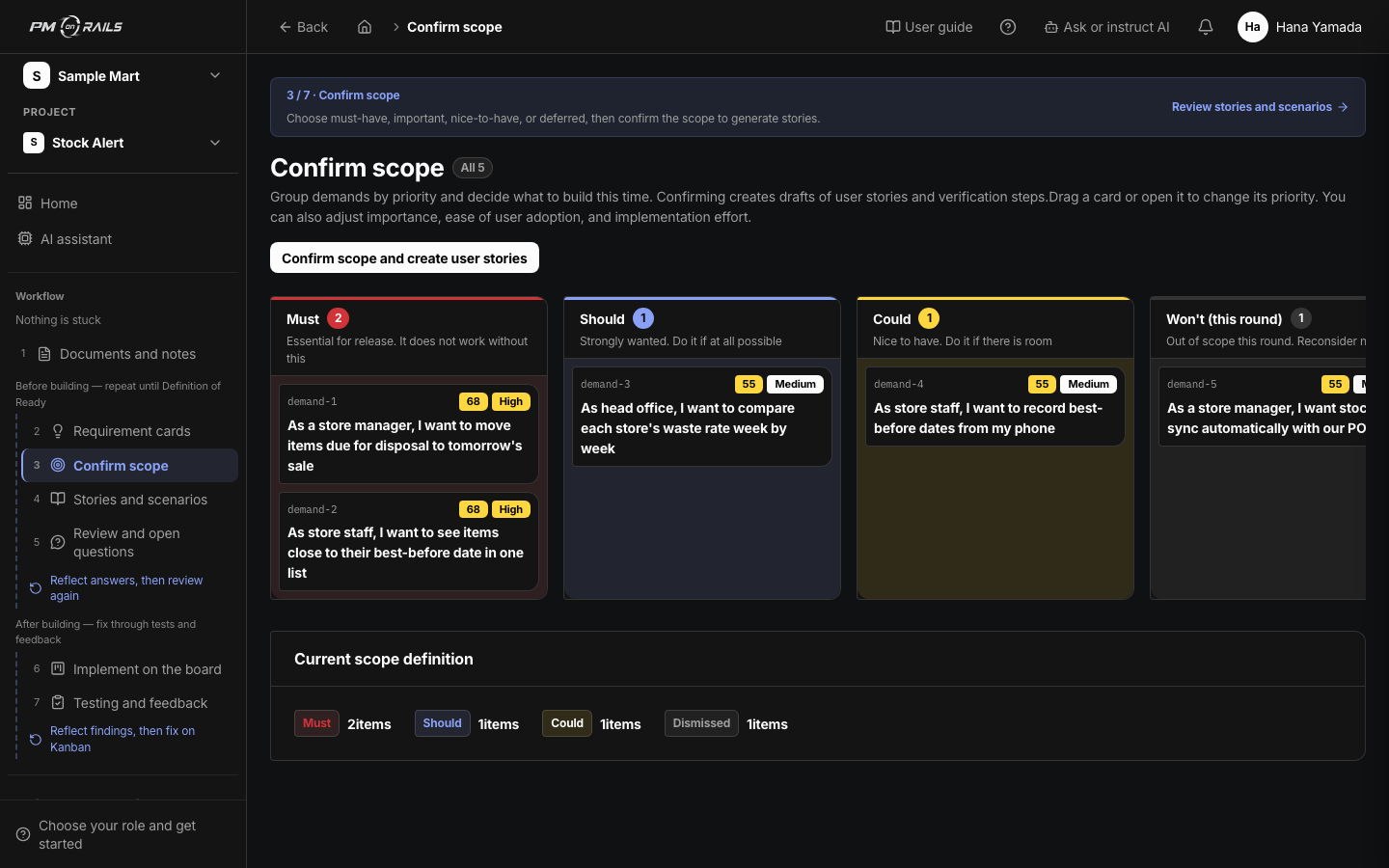
In or out of scope is written first
Scope board. Must / should / could / not this time. Before: scope stayed verbal. After: you agree what you will not build before development starts.
Open points become questions
Open questions. Unresolved items become asks you can send, with waiting status. Before: Slack threads were the source of truth. After: answers return as proposed spec updates.
Done is readable first
User stories with summaries and acceptance scenarios. Before: you judged done right before delivery. After: you agree what done looks like first.
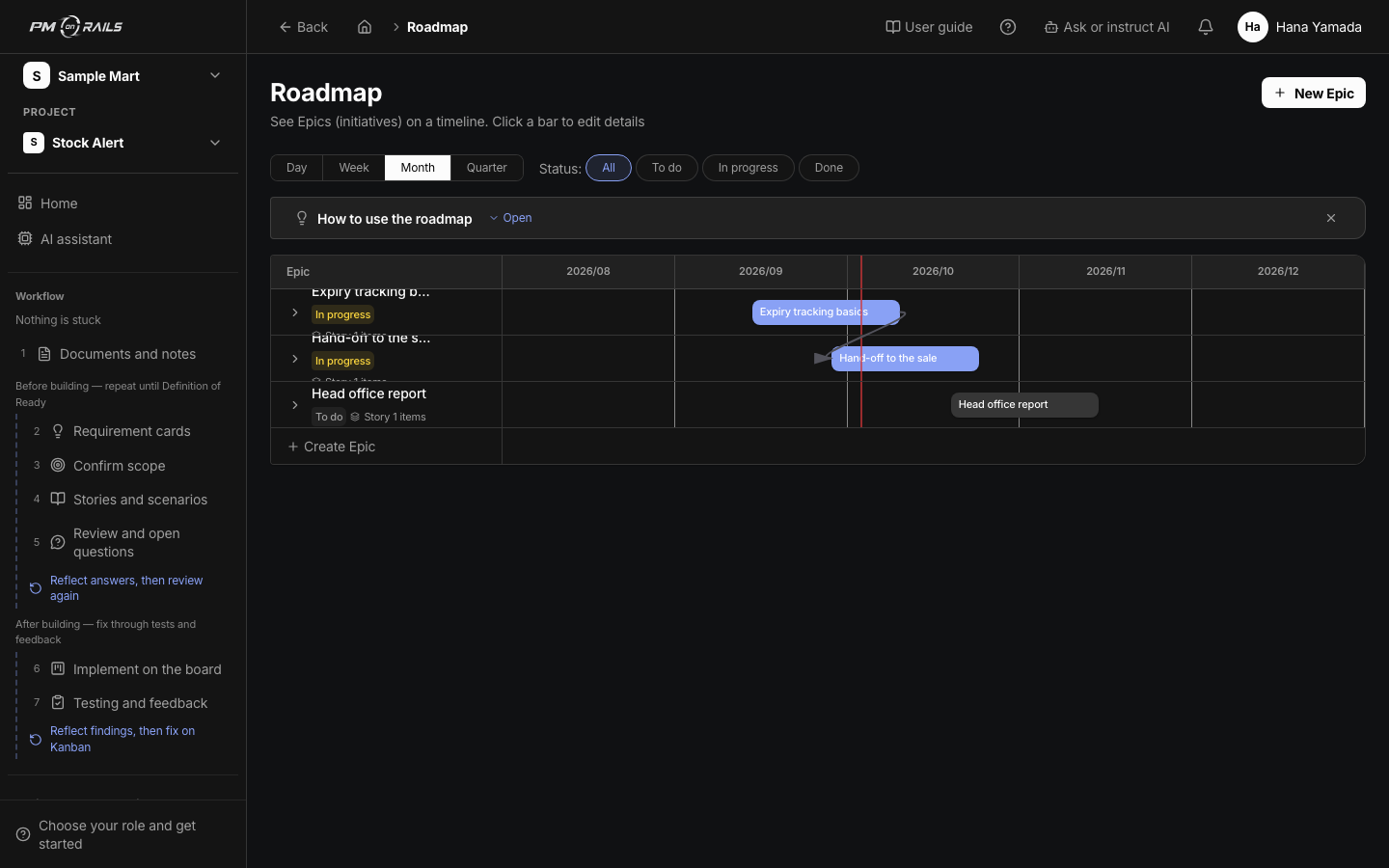
See when things will land
Roadmap of the large plan and what is being built now. Before: you waited for a report. After: a client can follow the current place themselves.
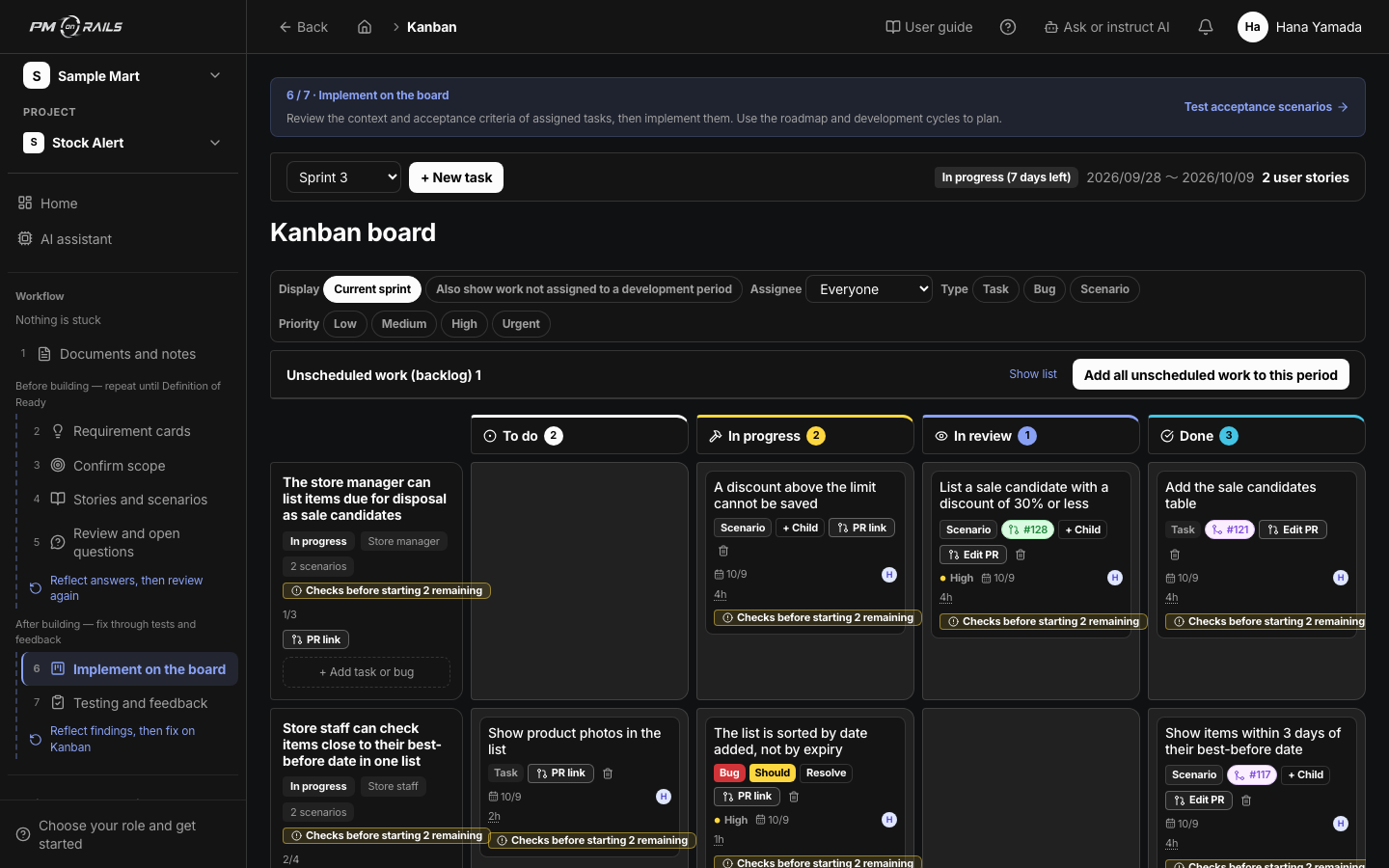
Daily work keeps moving
Board from to-do to done. Before: implementation moved and the board stayed stale. After: pull request activity returns to progress.
Delay and readiness on one screen
Dashboard of requirement readiness, your work and delays. Before: you assembled progress by hand. After: the material for review and decisions arrives on its own.
Connected to your AI agents
Claude Code / Codex integration. The same requirements, tasks and acceptance criteria while they build. Before: you passed a task title and let the agent guess. After: implementation starts with a map.
Why this
The point is not more features. It is one flow that finds what is vague, asks about it, reflects the answer and sends development activity back to progress. PM on Rails exists to close those gaps.
01
Requests, acceptance criteria, tasks and pull requests stay in one stream. You do not keep a meeting pack and a ticket board as two sources of truth.
02
Generation is a proposal. Creating requirements or questions, and confirming scope, waits for a person. Specs do not lock themselves.
03
Clients agree on screen, answers come back in Slack, and Claude Code or Codex reads the same acceptance criteria.
04
We use it every day on contract projects, including takeovers that had not reached a working state. It is not a process diagram written at a desk.
Requirements work does not stop at a document
After scope is confirmed, stories and acceptance criteria remain. A requirements tool alone never hands the decision to development. This product keeps what you decided connected through tasks and pull requests.
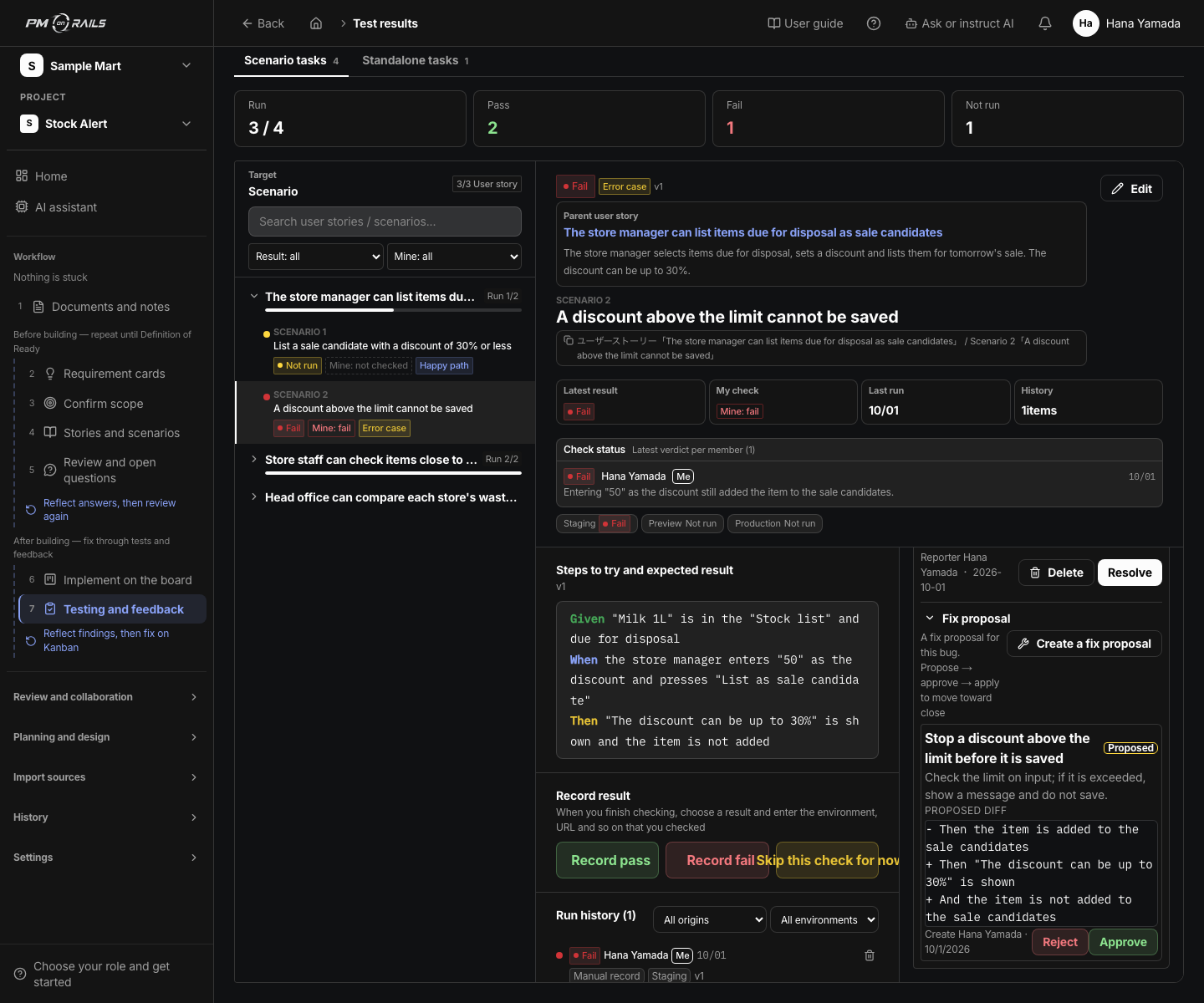
Changes return to the same flow
Change request. Proposed diff beside approve, reject and apply. Park it in another tool and the history breaks. This product keeps the reason for the change in the same request-and-task flow.
Automation
The strength of PM on Rails is not the number of features. It is that requirements, Slack follow-ups, task creation, AI-assisted development, pull request links and progress all move in one flow.
01
How AI and integrations help
Split meeting notes into requests, decisions, open questions, things to ask and out-of-scope items
What people review and decide
Check that it is right
02
How AI and integrations help
Turn each ambiguity into a question you can ask in Slack
What people review and decide
Check the question and destination before sharing
03
How AI and integrations help
Return answers as proposed updates to requirements, acceptance criteria and tasks
What people review and decide
Approve the update
04
How AI and integrations help
Check acceptance criteria, estimates and dependencies for gaps before work starts
What people review and decide
Decide the scope, assignees and dates
05
How AI and integrations help
Hand the request, acceptance criteria and task context to Claude Code or Codex
What people review and decide
Do the implementation
06
How AI and integrations help
Reflect activity from connected, linked pull requests in tasks and progress
What people review and decide
Review progress and test results
Check before work enters development
Requirement is clear
Acceptance criteria exist
Dependencies sorted
Stakeholders agreed
Features
Connect documents, requests, acceptance criteria and tasks to check readiness and progress. AI agents connected through MCP can work with the same information.
Turn meeting notes into requirement cards, open questions and explicit out-of-scope items.
Share questions in connected Slack channels and use the answers to propose specification updates.
State what done looks like in a form both engineers and AI agents can act on.
Expand requests into user stories, acceptance criteria and tasks.
With GitHub connected and a pull request linked to a task, pull request activity updates its status.
Use "My work" for assigned tasks and your schedule, and "Progress and management" for progress relevant to your role.
The entry point after login. Attach documents and talk; requirements, questions and tasks are created through confirmation cards. Continue on the right of any screen.
What people do
AI helps organise requests, draft questions and propose specification updates. People review the content and decide the scope, priorities, assignees and dates, then check test results after implementation.
Review what was flagged as ambiguous
Approve questions and the answers reflected back
Decide priority and how to proceed
Comparison
Typical tools wait for people to register information they already organised. PM on Rails moves management forward from meeting notes, Slack answers and pull request activity.
| Aspect | Typical tools | PM on Rails |
|---|---|---|
| Position | A requirements tool, or a task tracker | A delivery management OS run by AI agents |
| Input | People register information they already organised | Meeting notes, Slack answers and pull requests move it forward |
| Requirements | The PM re-reads everything and sorts it by hand | AI catches the vague parts and turns them into questions and proposed updates |
| Progress | The PM updates tickets | Pull request and schedule activity flows back into tasks and progress |
| AI coding | Engineers explain the background every time | The links between request, acceptance criteria and task go to Claude Code and Codex |
| Outsourcing / in-house | Hand it all to an agency or an engineer and hope | Without technical expertise you can still see what is open and how far it has gone |
Try it on the web
Log in and the AI assistant opens. Attach one document, review the requirement cards, then decide this round's scope. "Prepare for development" on Home guides you to the next screen.
Talk to us
Whether you want an external agency to work this way, you are building an in-house team, or you simply want the PM to stop doing manual clean-up: we will map which parts of your current meeting, Slack and task routine belong in PM on Rails.
01
The first win
Turn meeting notes and Slack answers into requirements and a clear list of open questions.
02
The next win
Extend it through tasks, pull requests and progress so delivery management runs on its own.
Free consultation